ShiftCare: a human-centered roster and client system.
A people-first platform for Australia's NDIS providers, in-home aged carers and allied health professionals. This case study covers the research, the data model, one design system shared by a web dashboard and two mobile apps, more than 60 screens, and an honest audit of what I would improve next.

Care is human. The paperwork around it isn't.
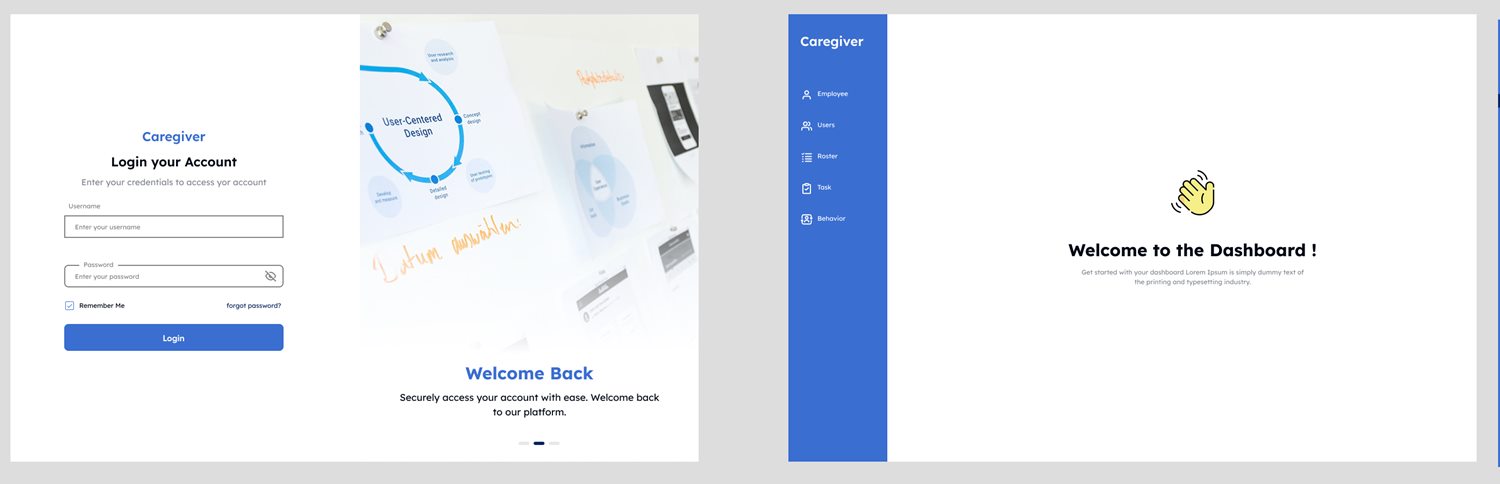
ShiftCare is a people-first SaaS platform designed to empower Australia's NDIS providers, in-home aged carers and allied health professionals. It simplifies employee and client management with a roster, task and communication platform tailored to regulatory needs.
This case study focuses on the roster management system, the user and employee profile architecture, and the task workflow. The aim was operational efficiency without losing human empathy.
Six overlapping challenges, grouped into three themes
Compliance
Staying NDIS compliant and handling certification and document expiry.
Design response. License expiry fields with validation, automatic reminders, and a single place to see who is expired.Coordination
Managing multiple workers and clients, with geolocation and navigation to client sites.
Design response. A roster that links employees, clients and addresses, with a route to each site.Record keeping
Logging shift-based activities on outdated tools such as spreadsheets and email chains.
Design response. Digital task, medicine and behaviour logs filled in during the shift, and a check-in and check-out by QR code.What I asked, and what it meant.
Primary research
Insights turned into design decisions
| What I found | What I built |
|---|---|
| Staff forget to upload new certifications. | Alerts triggered by license expiry date. |
| Getting to the client's site is a frequent frustration. | Address on every task, with distance and a maps route planner. |
| Notes taken by hand during shifts get lost. | Digital task, medicine and behaviour logs. |
| Staff often forget to check in. | Check-in prompt before the shift, and QR check-in and check-out. |
Three people, three surfaces.
The platform serves an organization and the people on either side of care. Each gets the interface that fits their context.
Sarah
29, casual care staff. Low technical literacy and prefers mobile-first simplicity.
Needs
- Track shifts and check in and out
- Upload licenses
- Add feedback and log incidents
Values
- Clear navigation
- Alerts
- Task checklists
Thomas
45, admin. Experienced with admin tools and works from a desktop all day.
Needs
- Assign shifts
- Verify certifications
- Get reports and manage unavailability
Values
- Transparency
- Batch operations
- Error-free logs
How might we…
make sure no shift is missed and no license silently expires?
let a manager build a roster in a few clicks instead of a spreadsheet?
help workers record what happened during care without adding paperwork?
give clients visibility of their tasks and budget without exposing what they shouldn't see?
Human-centered design, from paper to Figma.
The process
- 1
Empathize
Interview support workers and understand their context.
- 2
Define
Core pain points: shift tracking, task compliance and document renewal.
- 3
Ideate
Paper sketches, then wireframes, then Figma prototypes.
- 4
Prototype
Usability-focused design with minimal friction.
- 5
Test
Two usability rounds through Maze and moderated Zoom sessions.
Prioritizing what to build first
Must have
- Sign in for all three roles
- Employee and user records
- Roster with tasks
- Check-in and check-out
Should have
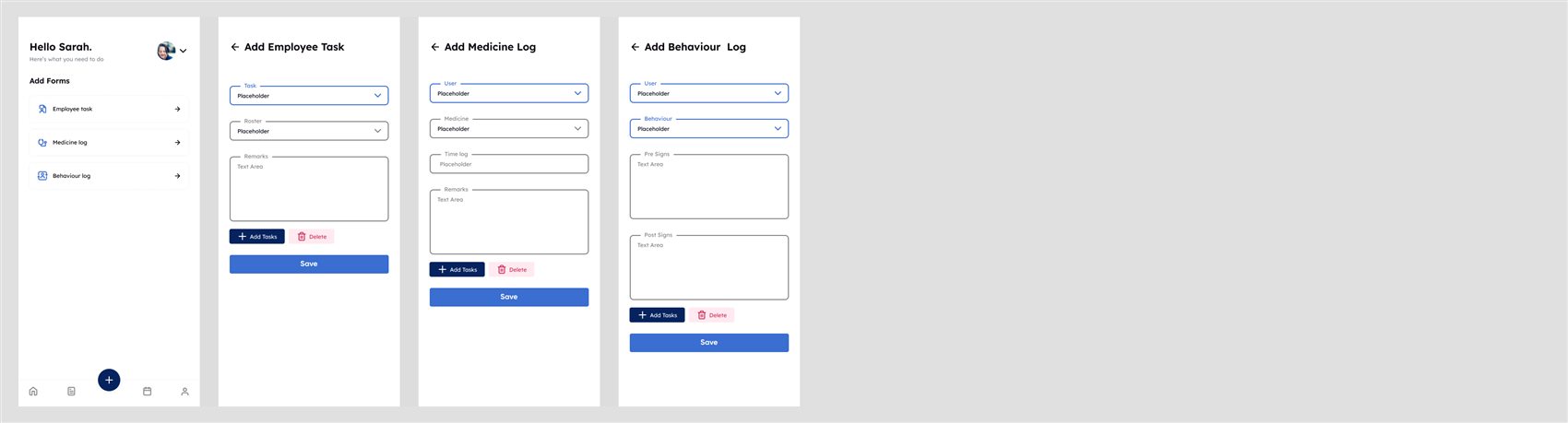
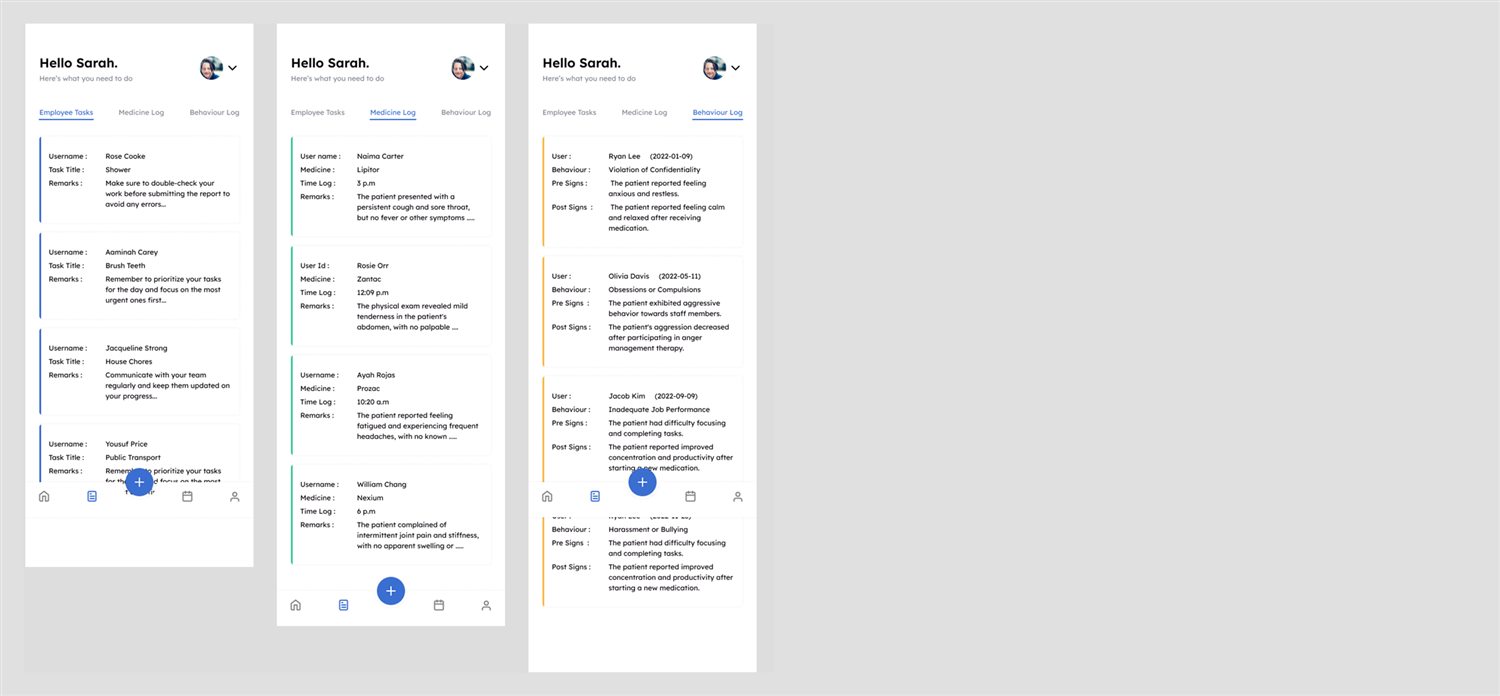
- Task, medicine and behaviour logs
- License expiry alerts
- Profile and budget view
Could have
- Calendar day, week and list views
- PDF import
- Search and pagination
Later
- Offline-first mobile
- Smart log suggestions
- Predictive unavailability
One system for three products.
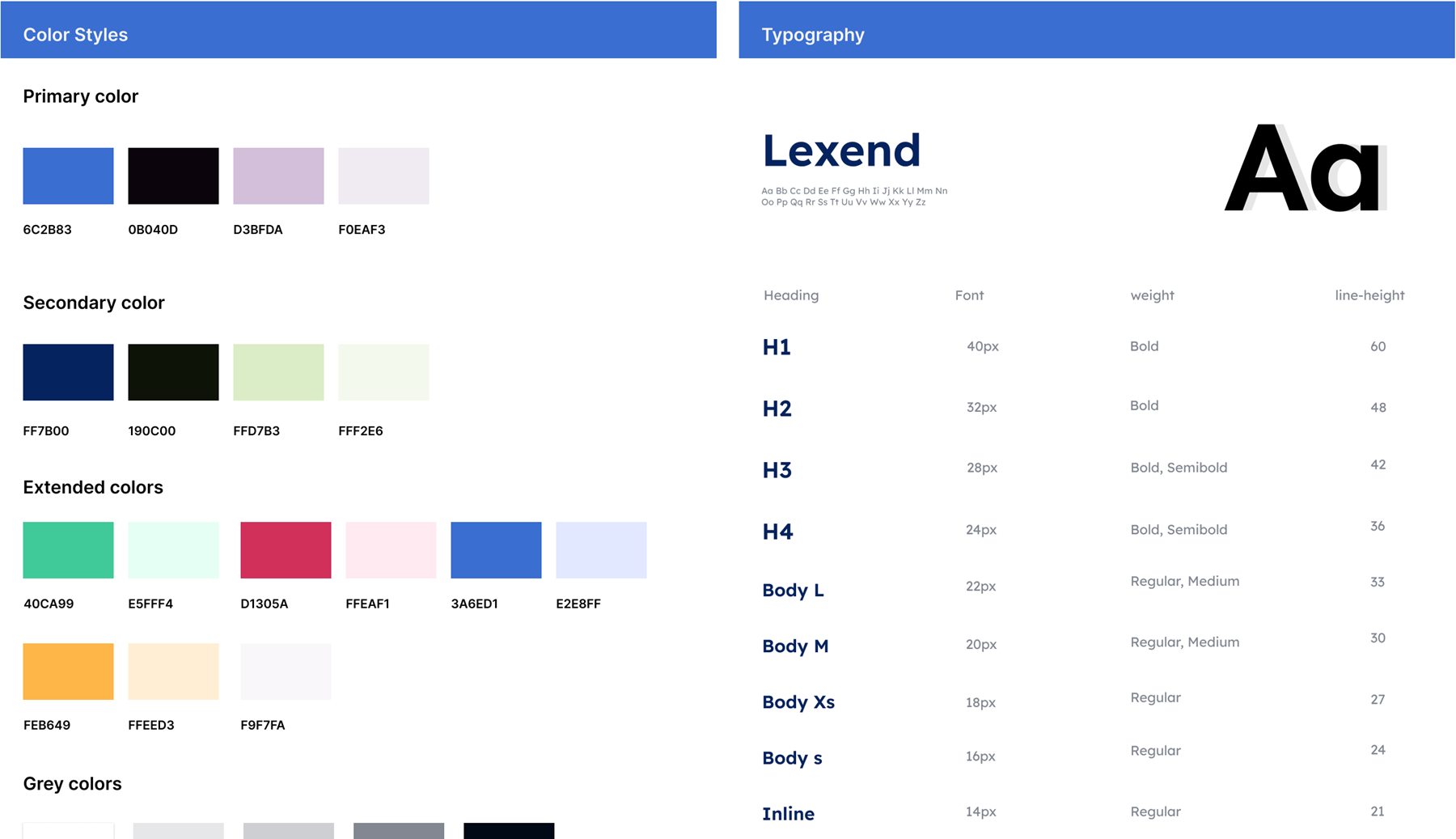
A web dashboard and two mobile apps had to feel like the same product. I defined one system in Figma: color styles, a Lexend type scale, and components with every state, built once and used everywhere.
Color
Primary blue and navy, secondary and extended colors for status, and a grey ramp for surfaces and text.
Typography
Lexend from H1 at 40 px down to inline text at 14 px, with line heights fixed per level.
Components
Inputs, dropdowns, buttons in six states, date and year pickers, PDF upload, pagination, pills and a task calendar.
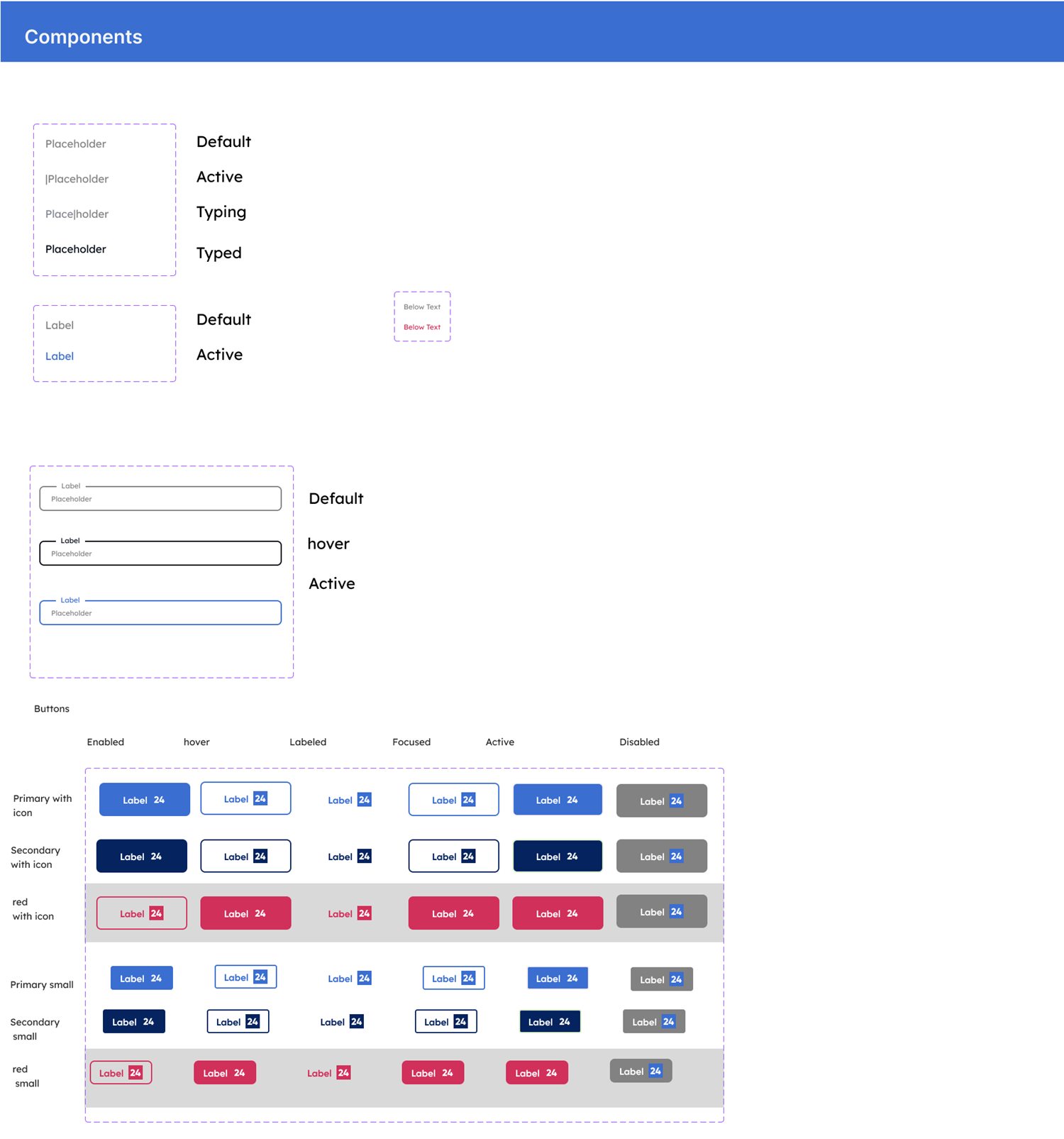
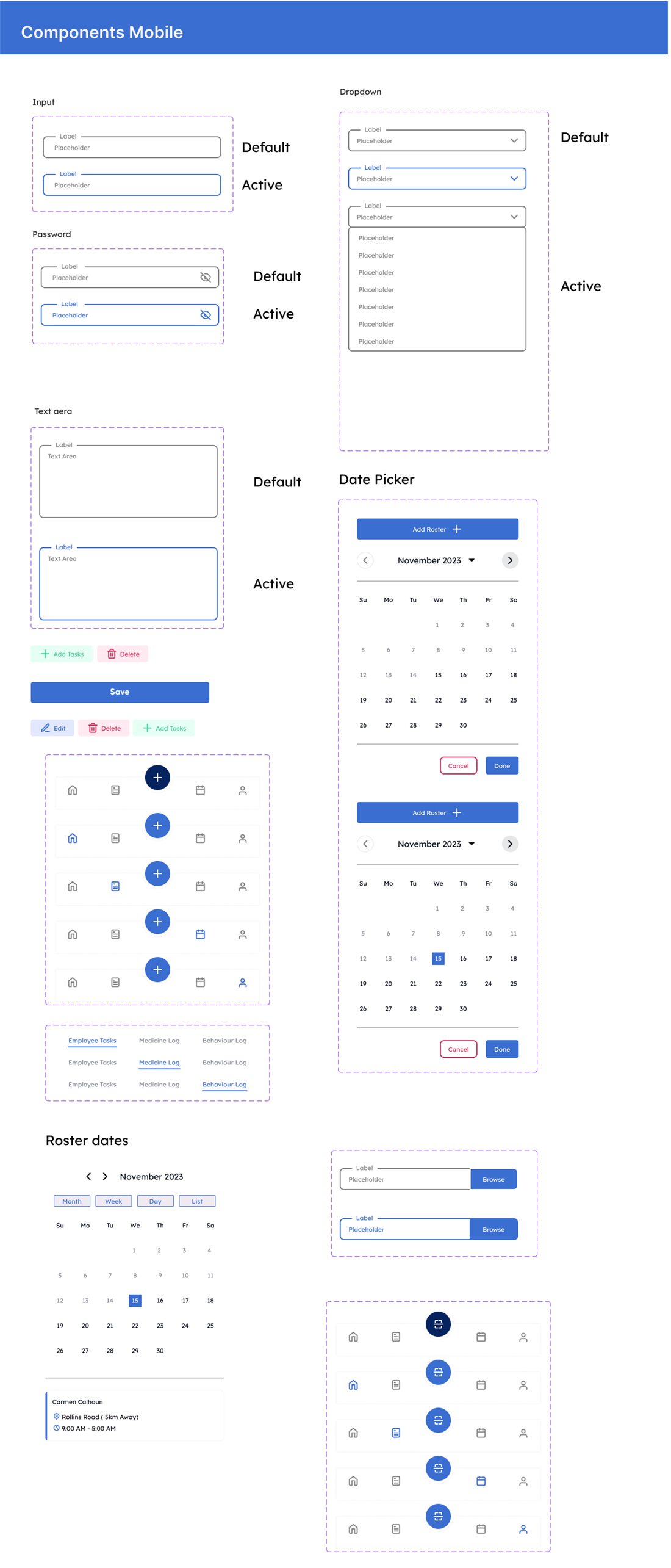
Each control is documented in default, hover, active, typing and disabled states, so developers never guess. The mobile set adds larger touch targets and a bottom tab bar with a raised scan button.
Built for the roster manager.
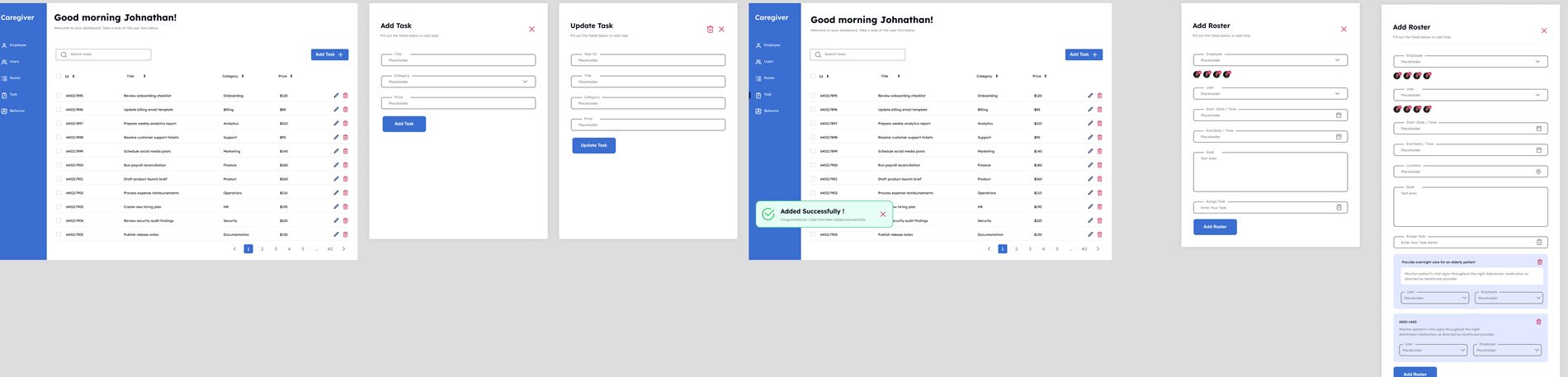
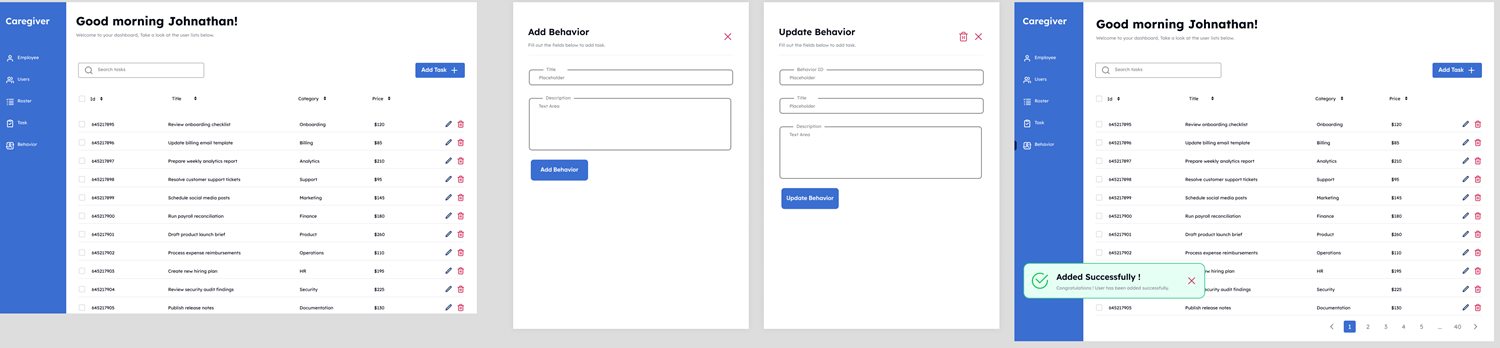
The web dashboard is where an organization manages employees, users, rosters, tasks and behaviors. A left navigation gives one section per record type. Every section repeats the same pattern: a searchable table, an add form and an update form. Once a manager learns one, they know all of them.
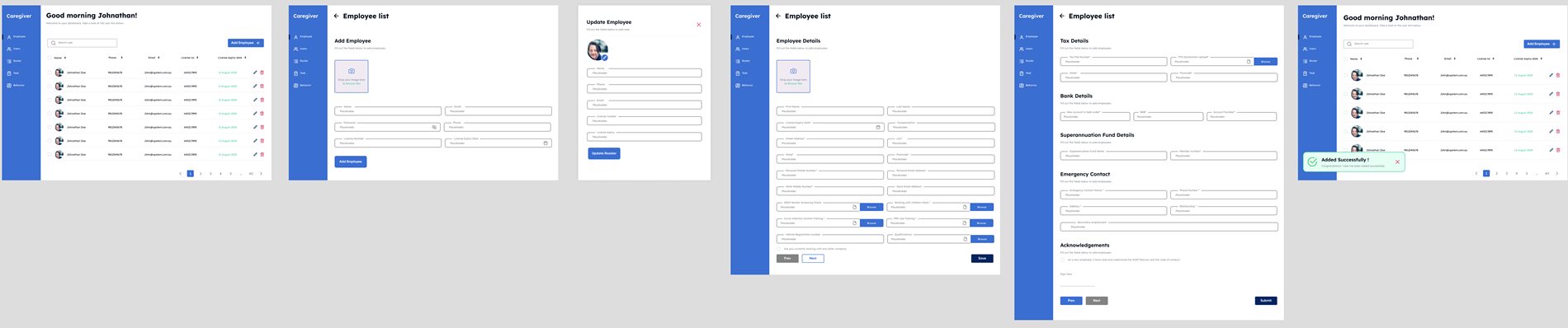
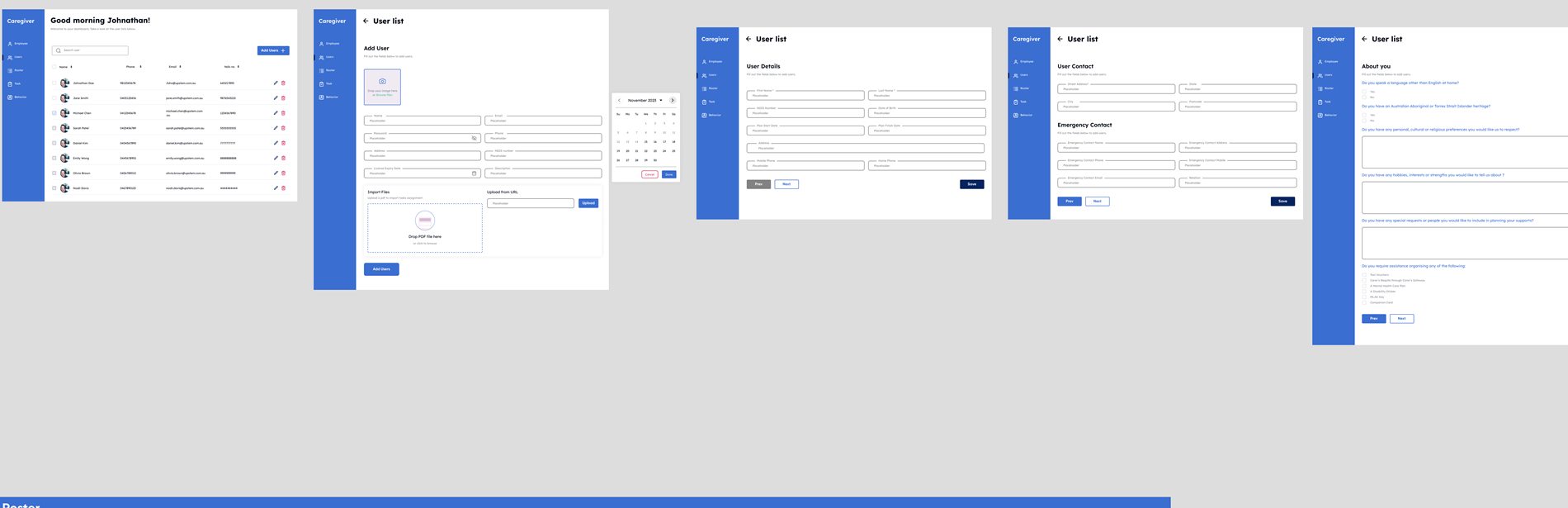
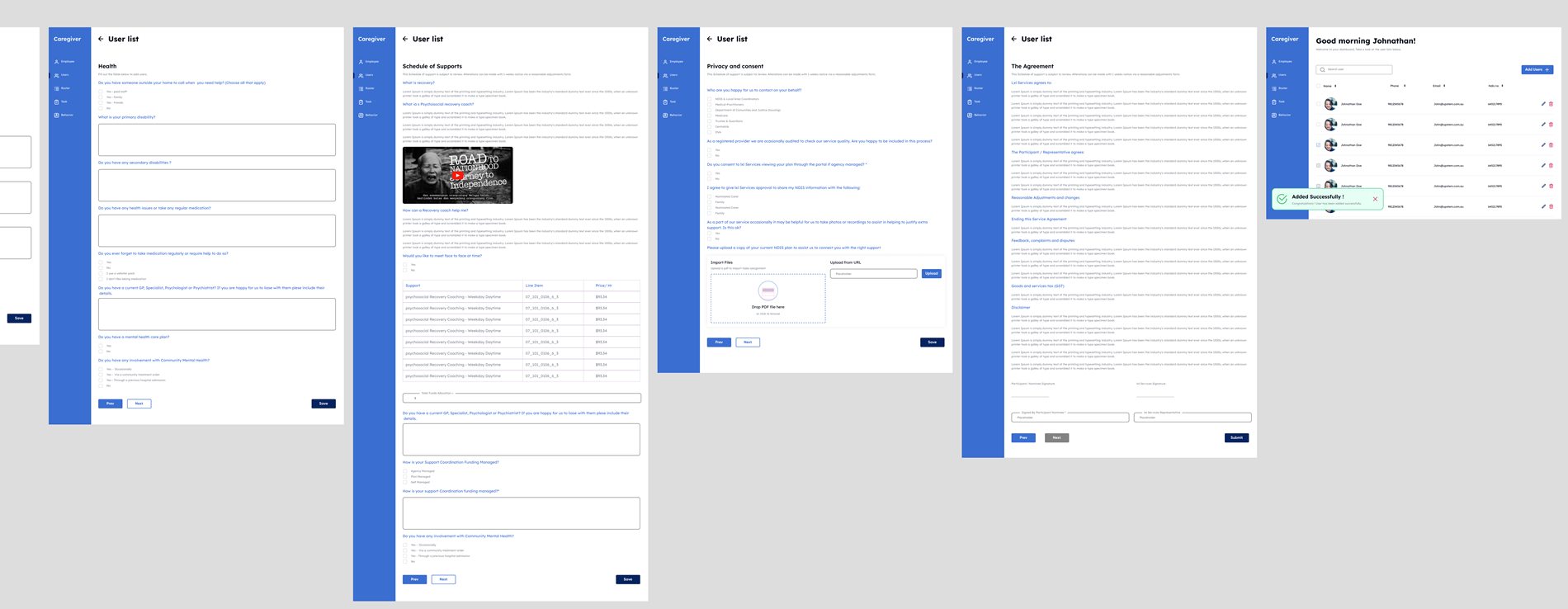

Add user and add employee flows
Fields cover name, contact, NDIS ID, license expiry and photo. Expired licenses are validated, documents can be dragged in or imported by URL, and password fields have a visibility toggle.
Roster flow
Assign several employees to one user or the reverse, choose date and time with smart constraints, group tasks, and set the location with an embedded map. Goals and tasks expand in place.
One hand, on the move.
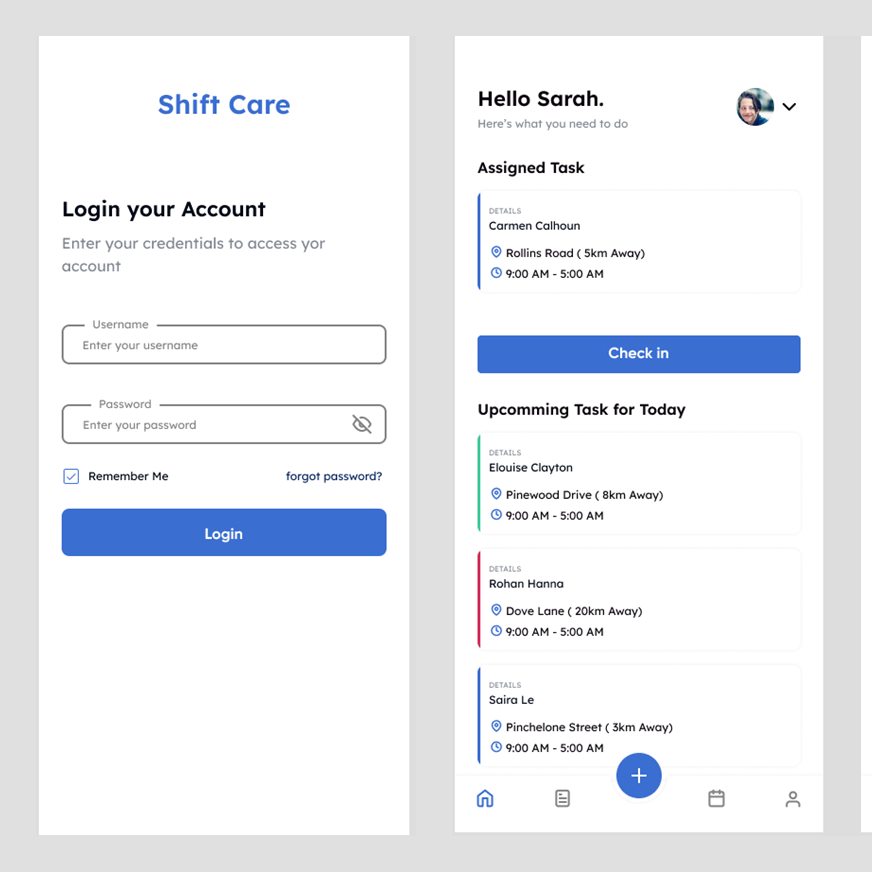
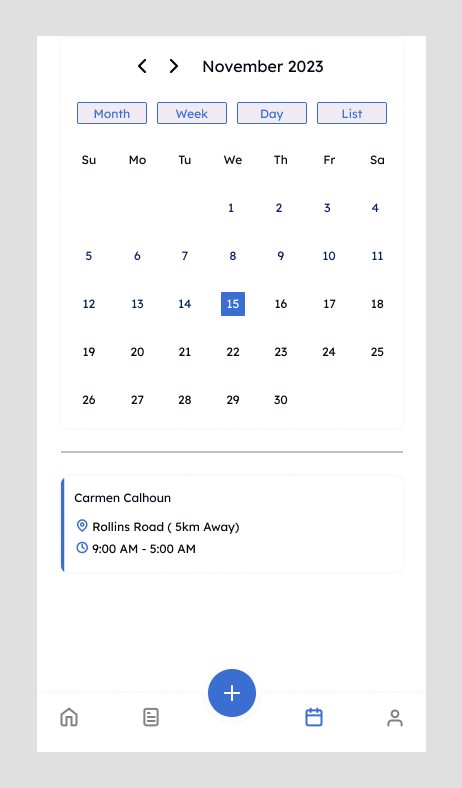
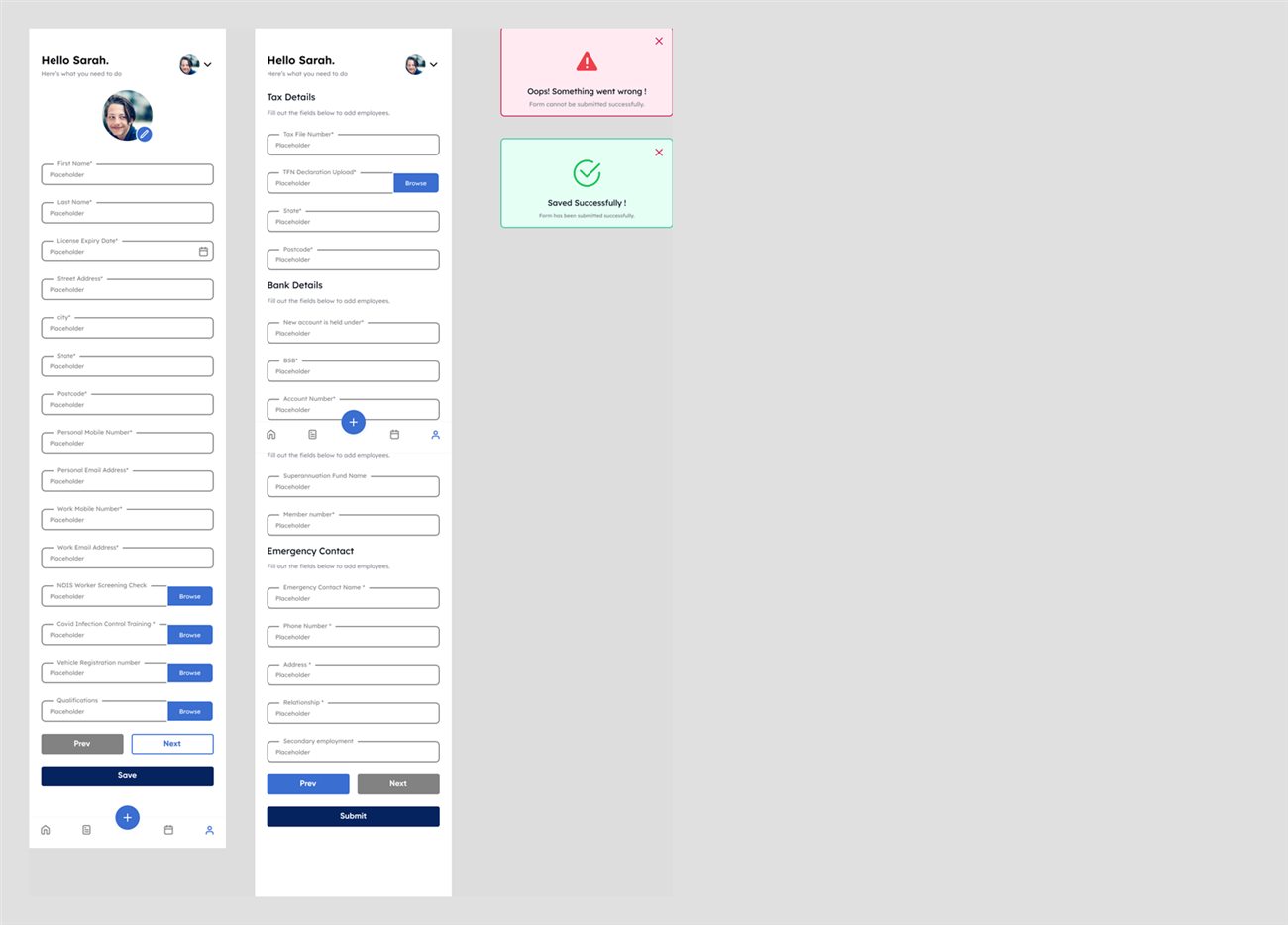
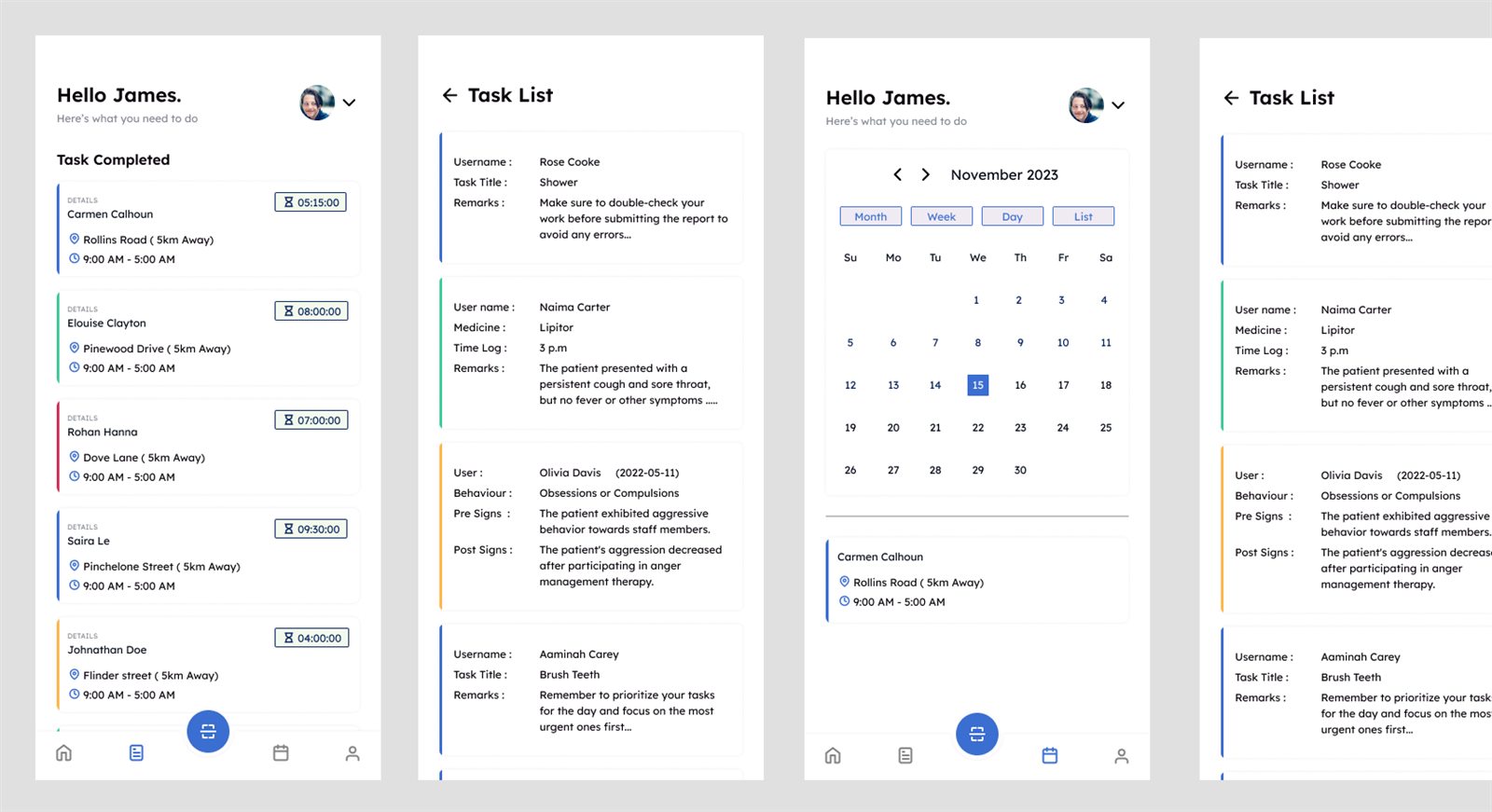
Sarah is walking between clients with a phone in one hand. The app opens on the next thing she has to do and keeps the rest one tap away.
Visibility for the person receiving care.
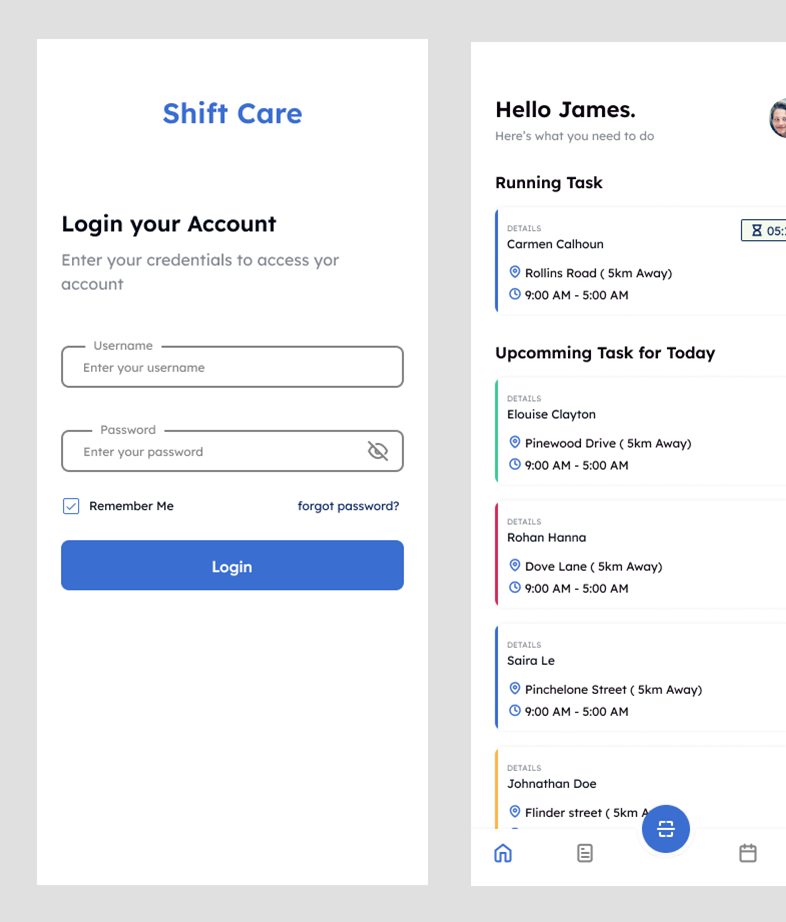
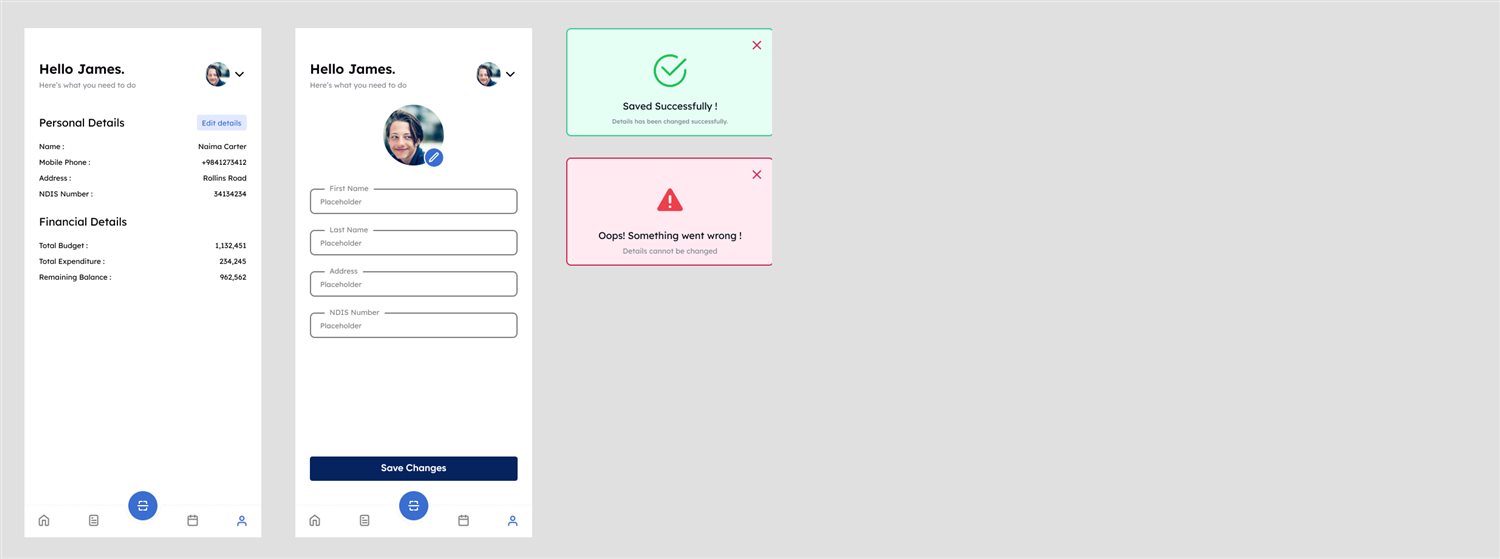
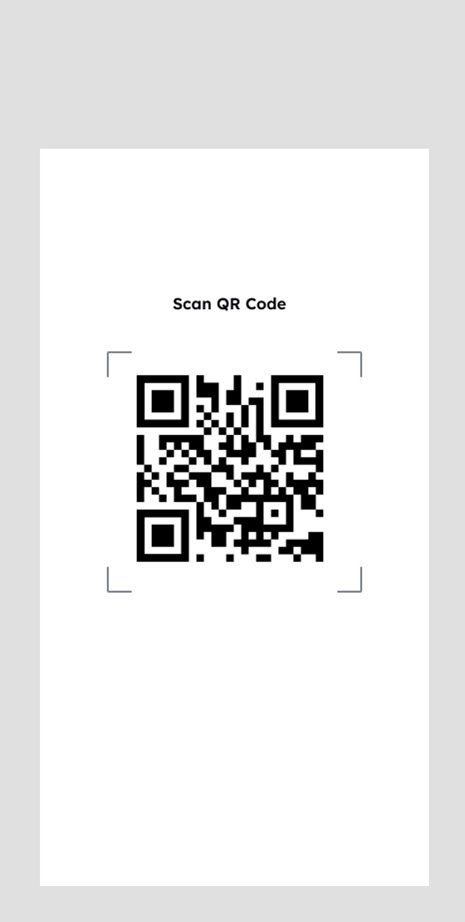
James is a client. His app is deliberately lighter. It shows the care he has received, what the worker noted, and his budget, and it lets him confirm a visit with a QR code.
Decisions, and the reasons.
| Principle | Where it shows up in ShiftCare |
|---|---|
| Hick's Law | The mobile tab bar has four destinations plus scan. Web navigation has one entry per record type. |
| Jakob's Law | Tables, search and pagination look like every admin tool a manager already knows. Mobile follows bottom tabs and a calendar. |
| Fitts's Law | Check in is a full-width button placed at the bottom of the first card. The scan button is raised and centered. |
| Consistency | Every web section uses the same list, add and update pattern, and one design system serves all three products. |
| Recognition over recall | Workers select the client and item from dropdowns instead of typing them. |
| Error prevention | License expiry validation, confirmation before adding an employee, and constraints on roster times. |
| Visibility of status | Success and error cards after saving, colour-coded task edges, and a visible running task. |
| Chunking (Miller's Law) | Long client onboarding is split into separate pages, each with a single topic. |
What I'd fix in the next round.
Reviewing my own screens against usability heuristics and accessibility guidelines showed real gaps. Listing them is part of the process.
| Finding | Principle | Severity | Proposed fix |
|---|---|---|---|
| Task and status are separated only by the colour of a thin left edge (red, green, yellow, blue). | WCAG 1.4.1 Use of color | Major | Add a text status and an icon beside each task. |
| Secondary text in the mobile cards is very small and light grey. | WCAG 1.4.3 Contrast, legibility | Major | Minimum 12 px and a darker grey that reaches 4.5 : 1. |
| Mobile profile is one long form with about twenty fields. | Hick's and Miller's laws | Moderate | Split into steps with a progress bar, as the web onboarding already does. |
| Web tables are dense, with small text and icon-only edit and delete actions. | Recognition over recall | Moderate | Larger row height, labelled actions and confirmation on delete. |
| Field labels sit inside outlined boxes and can be low contrast against the input border. | WCAG 1.4.11 Non-text contrast | Moderate | Visible labels above fields and a border that reaches 3 : 1. |
| Check-in depends on a QR scan, with no fallback if the camera fails. | Error recovery | Moderate | Offer a manual check-in with a reason, and log it for the manager. |
| Placeholder text such as "Placeholder" and repeated sample remarks still appear in several screens. | Content quality | Minor | Field-specific hints and real microcopy. |
What testing told me.
Two usability rounds, run through Maze and moderated Zoom sessions, checked check-in, roster creation and logging. Feedback shaped the screens above.
“The check-in alert saved me so many times. I used to forget the exact shift start.”
Support worker, field staff“Now I can assign 5 shifts in a few clicks, and see who has an expired cert in one place.”
Roster manager, adminCompliance and care, in one place.
ShiftCare's employee and roster management bridges the gap between compliance and care. Through a process rooted in empathy and supported by research, the result is a platform that is not just functional, but meaningful in the daily work of care.
Model the data first
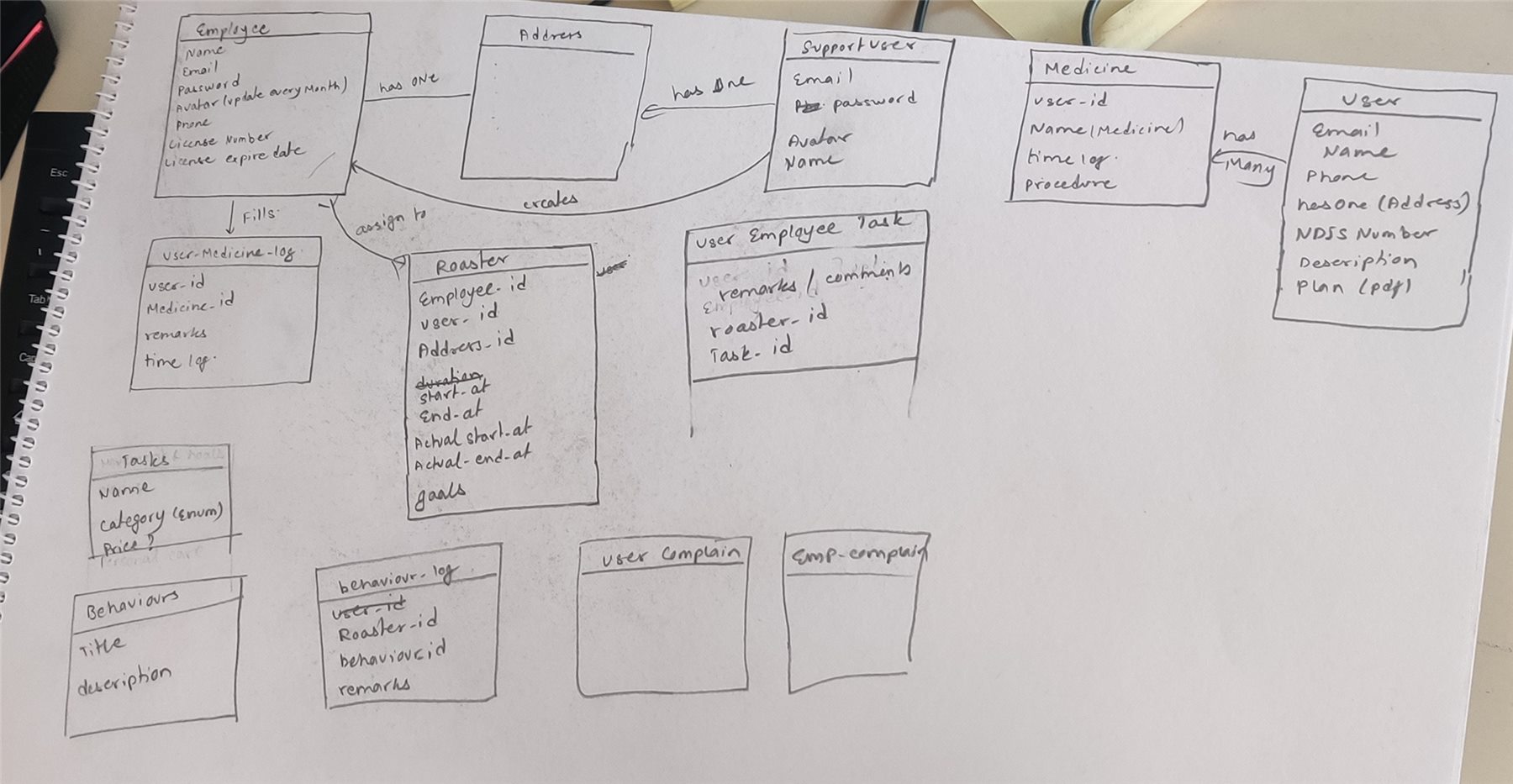
A hand-drawn data model made the roster the center of every screen.
One system, many surfaces
Components built once kept three products consistent.
Never rely on colour alone
Status needs text and icons, especially in a job done on the move.
Mobile rollout, offline-first
Let workers keep logging where reception is poor.
Smart behavior log suggestions
Suggest wording from earlier logs for a worker to confirm.
Predictive unavailability
Warn managers early based on past patterns.