From first call to finished job, without the whiteboard.
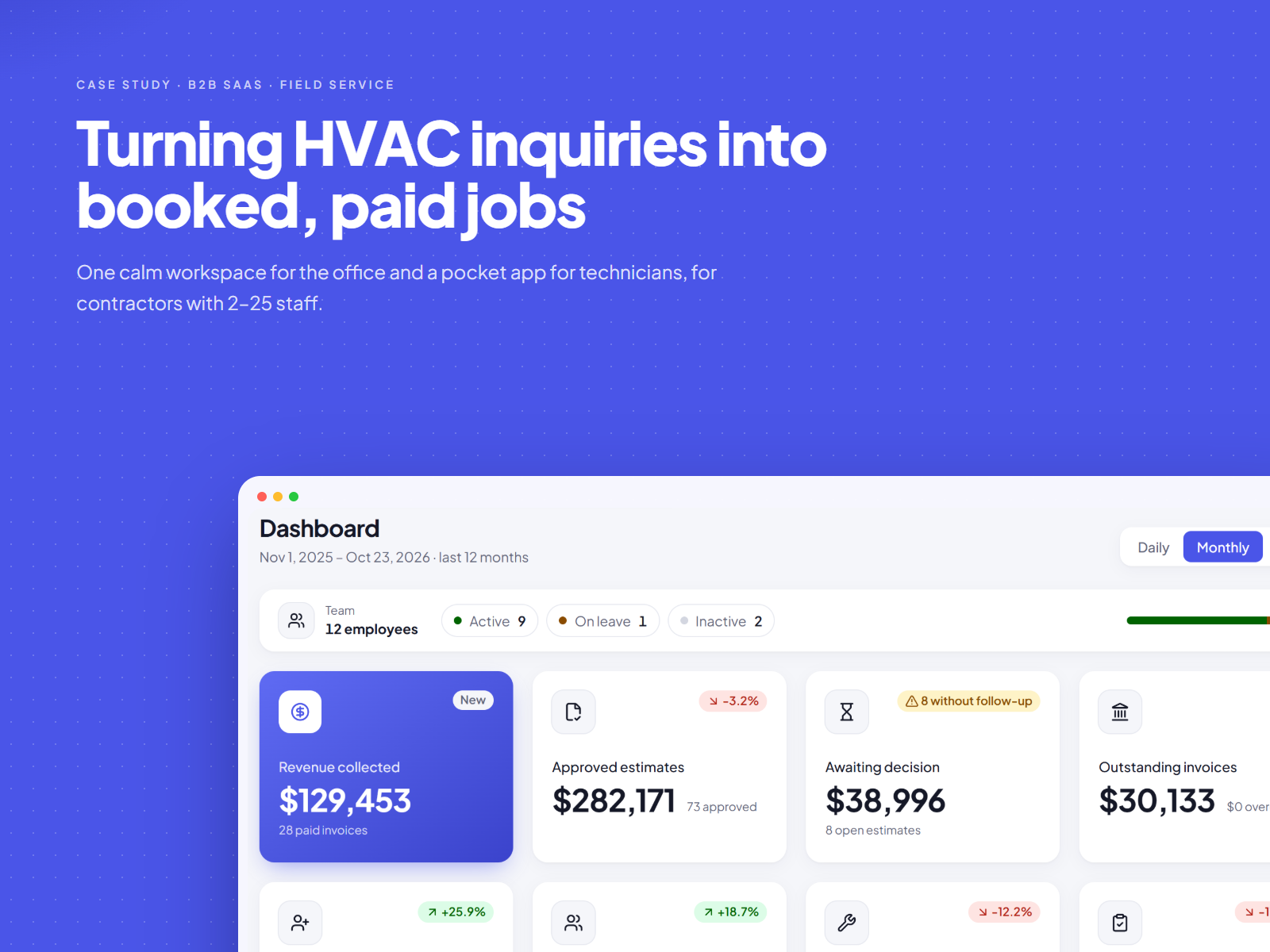
Designing an operations platform for small residential HVAC contractors: lead capture, estimates, follow-ups, dispatch and a technician app, built as one product so nothing falls between the cracks.
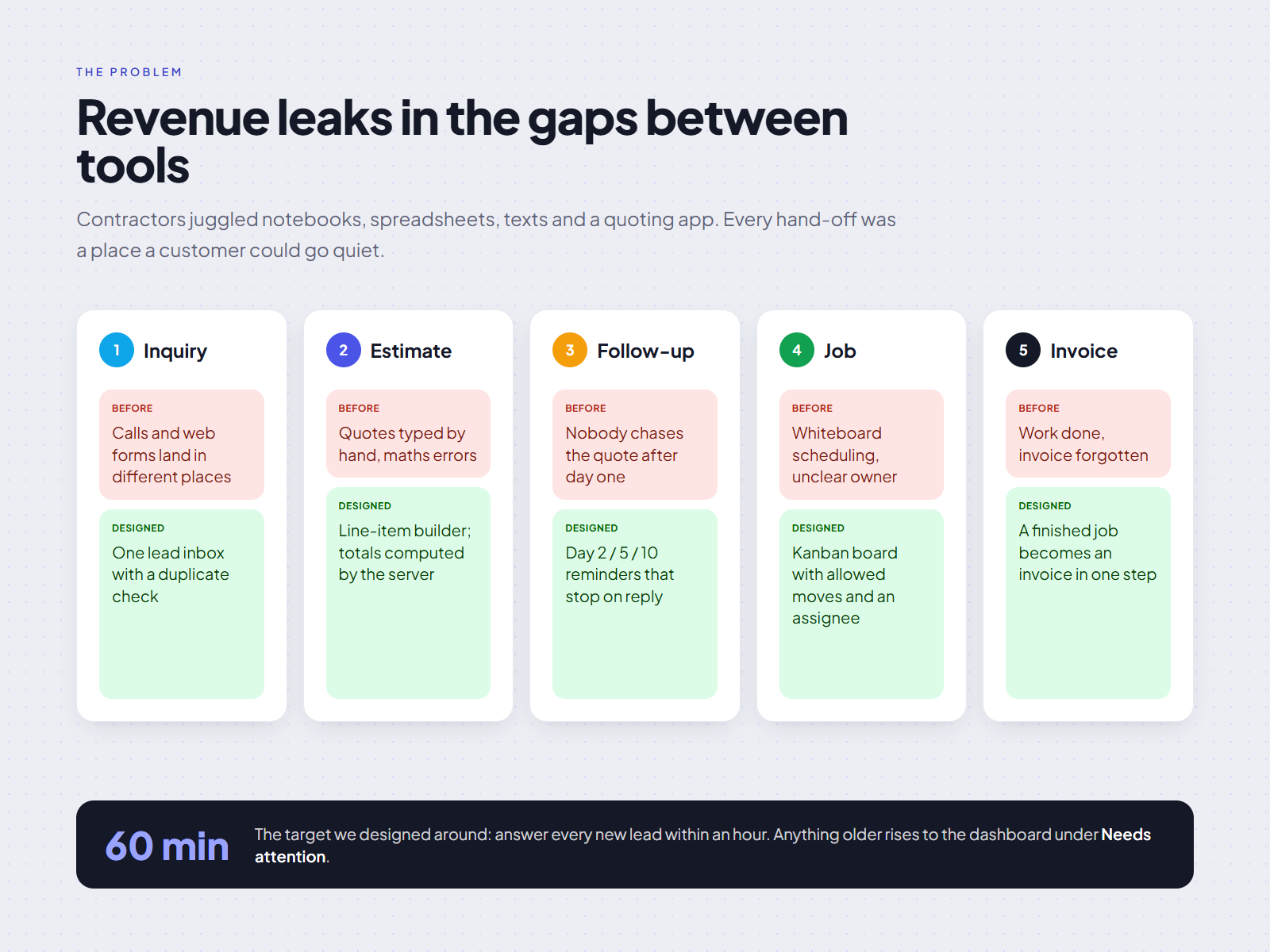
Revenue leaks between tools.
A typical shop has 2–25 people. Calls land on the owner's phone, leads live in a notebook or spreadsheet, estimates are built in a word processor, and the schedule is a whiteboard in the office. Each hand-off between those tools is a place where a job quietly disappears.
The pattern was consistent across conversations: the work wasn't lost because people were careless, it was lost because nothing told them it was waiting. A lead not called back within the hour, an estimate sent and never chased, a technician who didn't know the job had moved.
Two people, two very different days.
Contextual interviews with owners and office staff, ride-alongs with technicians, and a review of the spreadsheets and paper forms shops already used. That shaped two primary personas.
The owner / office manager
At a desk or in the truck between calls. Juggles sales, scheduling and money.
- Needs to know, at a glance, what is waiting on them.
- Won't open five screens to answer "who's free Thursday?"
- Has been burned by software that lets the numbers drift.
The technician
On a roof or in a crawlspace, gloves on, patchy signal, phone in one hand.
- Wants today's jobs, the address and the access notes. Nothing else.
- Large targets, one-thumb reach, readable in sunlight.
- Will abandon anything that asks for data entry on site.
The journey we designed around
- 01Call comes in
Lead captured in under a minute
- 02Site visit
Booked from the lead
- 03Estimate
Options, sent by link
- 04Follow-up
Automatic, day 2 · 5 · 10
- 05Dispatch
Assigned on the board
- 06Done
Closed from the field
What "good" had to mean.
Five calls that shaped the product.
A dashboard that answers "what's waiting on me?"
Early concepts led with charts. Owners skipped right past them. The final home puts money awaiting a decision first, then a ranked Needs attention list written as sentences ("8 open estimates have no active follow-up"), each linking straight to the fix. The pipeline sits beside it for context, not as the hero.
Trade-off. Fewer vanity metrics on screen, in exchange for zero-thought next actions.
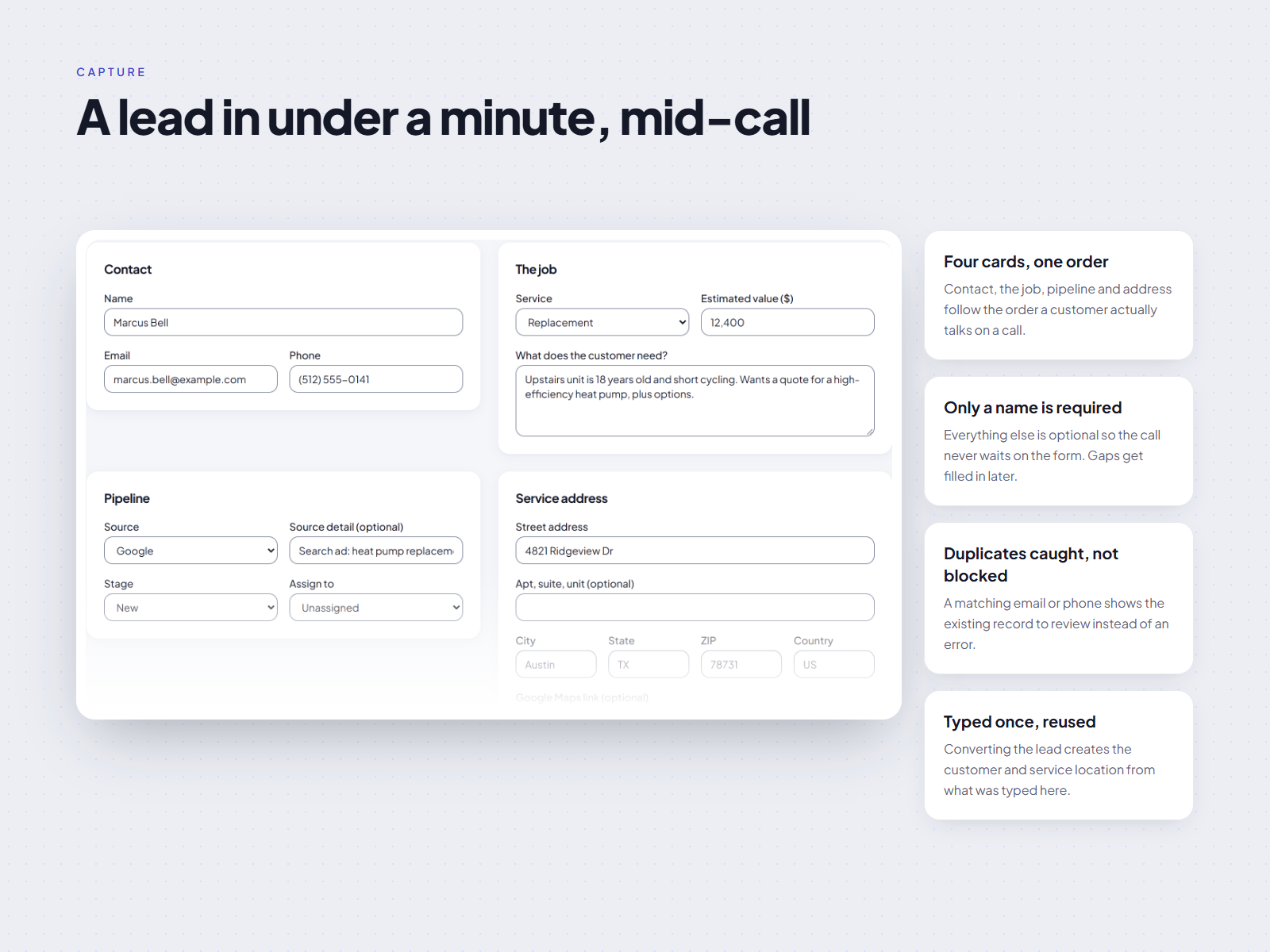
A lead form you can fill while still on the phone
Only name and one way to reach the customer are required; everything else can wait for the site visit. Duplicate detection runs on email and phone as you type, so a repeat caller is linked rather than re-entered. Converting a lead to a customer is safe to press twice: a double tap never creates two records.
Trade-off. Thinner records up front; we rely on the pipeline stages to prompt for the rest later.
Make the chase the default, not a chore
Sending an estimate schedules follow-ups on day 2, 5 and 10 automatically. They stop the moment the customer approves, declines or replies, so nobody gets nagged after saying yes. The office sees the schedule on the estimate and can pause it in one click.
Estimates move through a fixed set of states (draft, sent, viewed, approved, declined). The UI only offers the actions that state allows, and totals are always recalculated by the system in whole cents, so a line item edited on one screen can never disagree with the total on another.
- Draft
- Sent
- Viewed
- Approved or Declined
A board that can't be dragged wrong
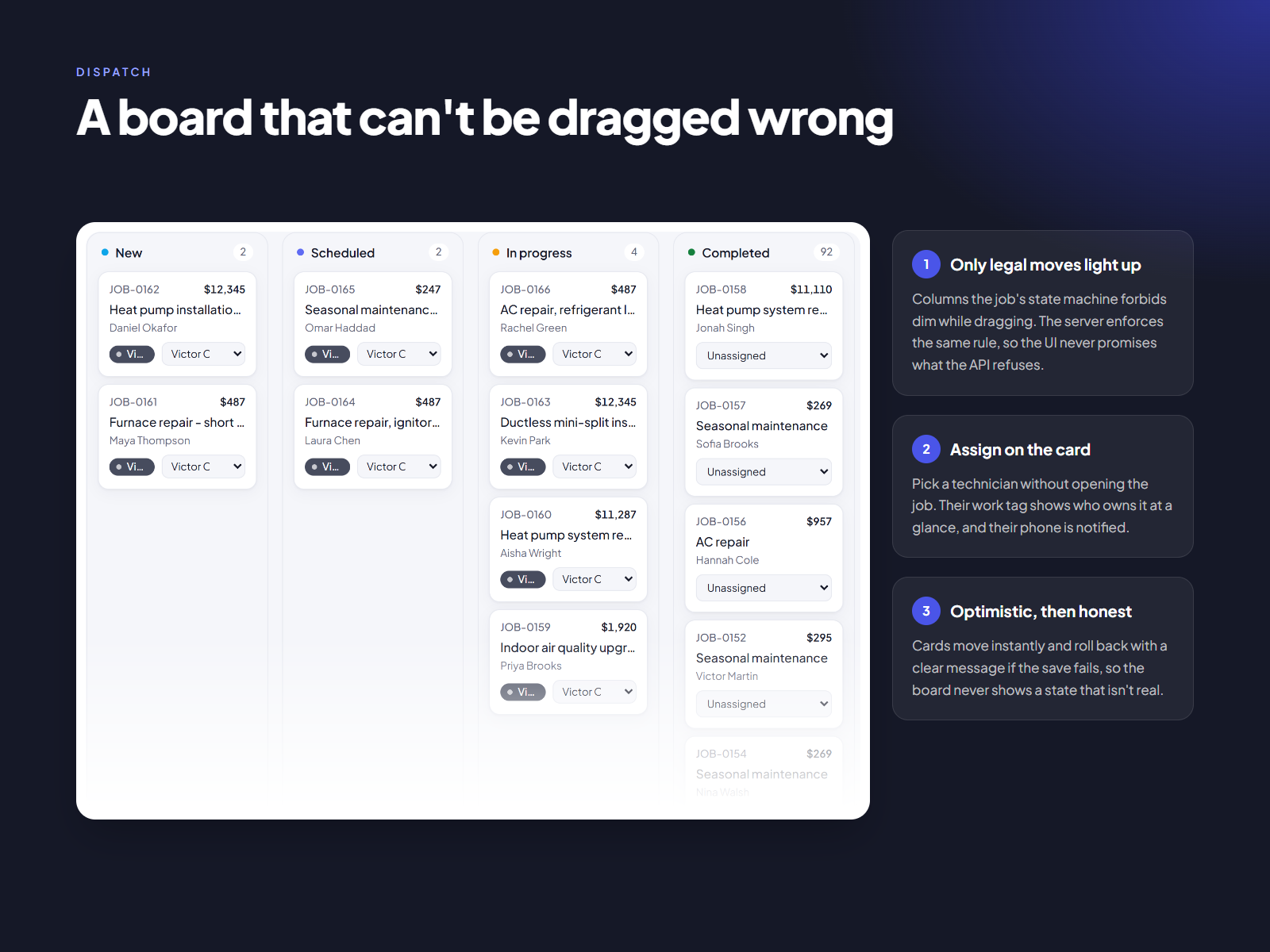
Office staff think in columns, so the job board is a kanban. But a free-for-all kanban lets you drag a job from New straight to Completed. Here, columns a job can't legally reach dim while dragging, and the server enforces the same rule.
Technicians are assigned from a menu on the card. The change shows instantly and rolls back with a clear message if saving fails, a fix that came directly from a pilot complaint that the board "didn't update".
One job, one big button
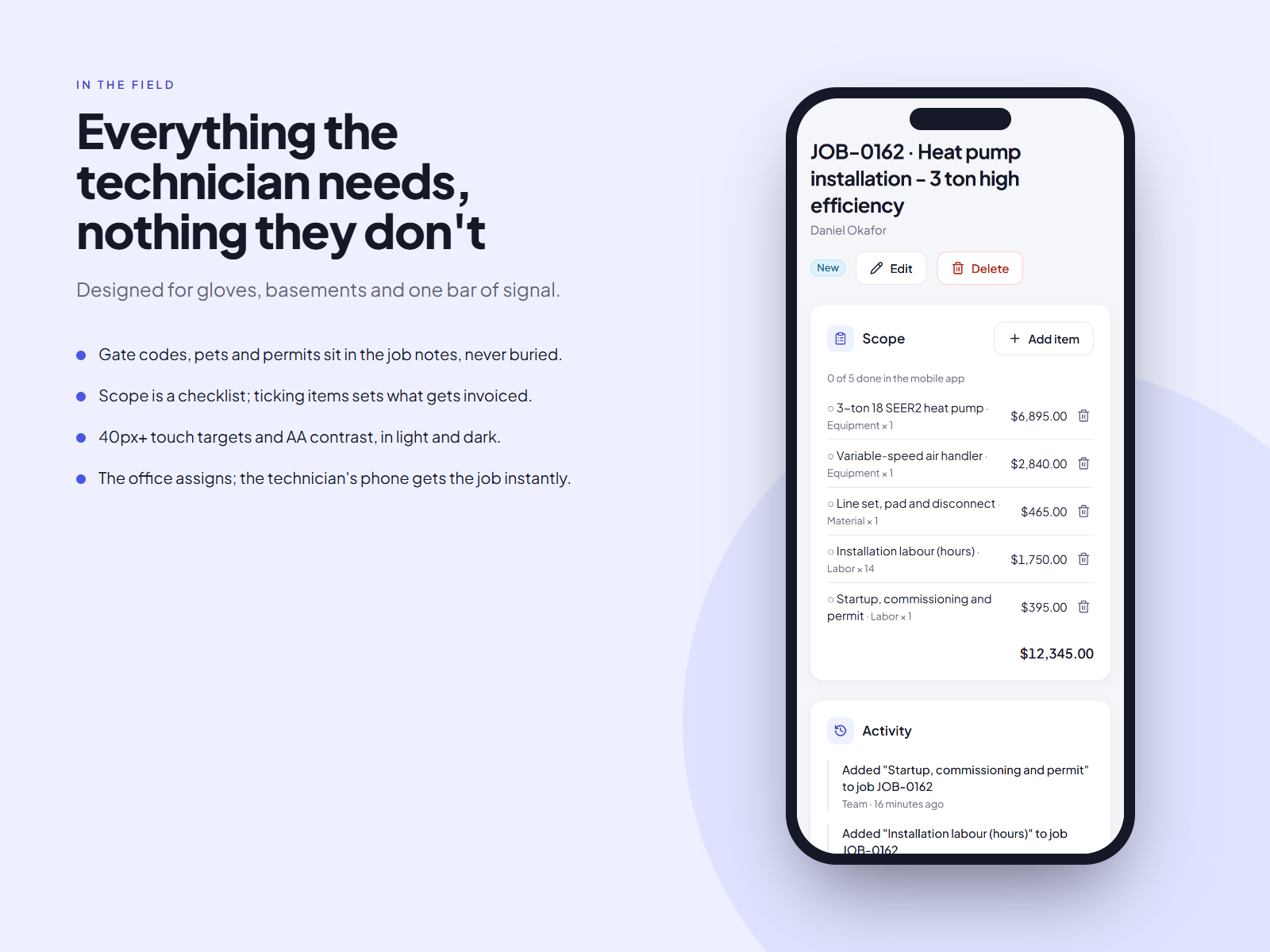
The technician view drops everything office-shaped. Today's jobs, the address with one-tap directions, access notes, and a single primary action that changes with the job: Start, then Complete. Targets are at least 40px and the primary action sits in thumb reach.
Trade-off. No estimate editing in the field for v1. Ride-alongs showed it happened back at the truck anyway.
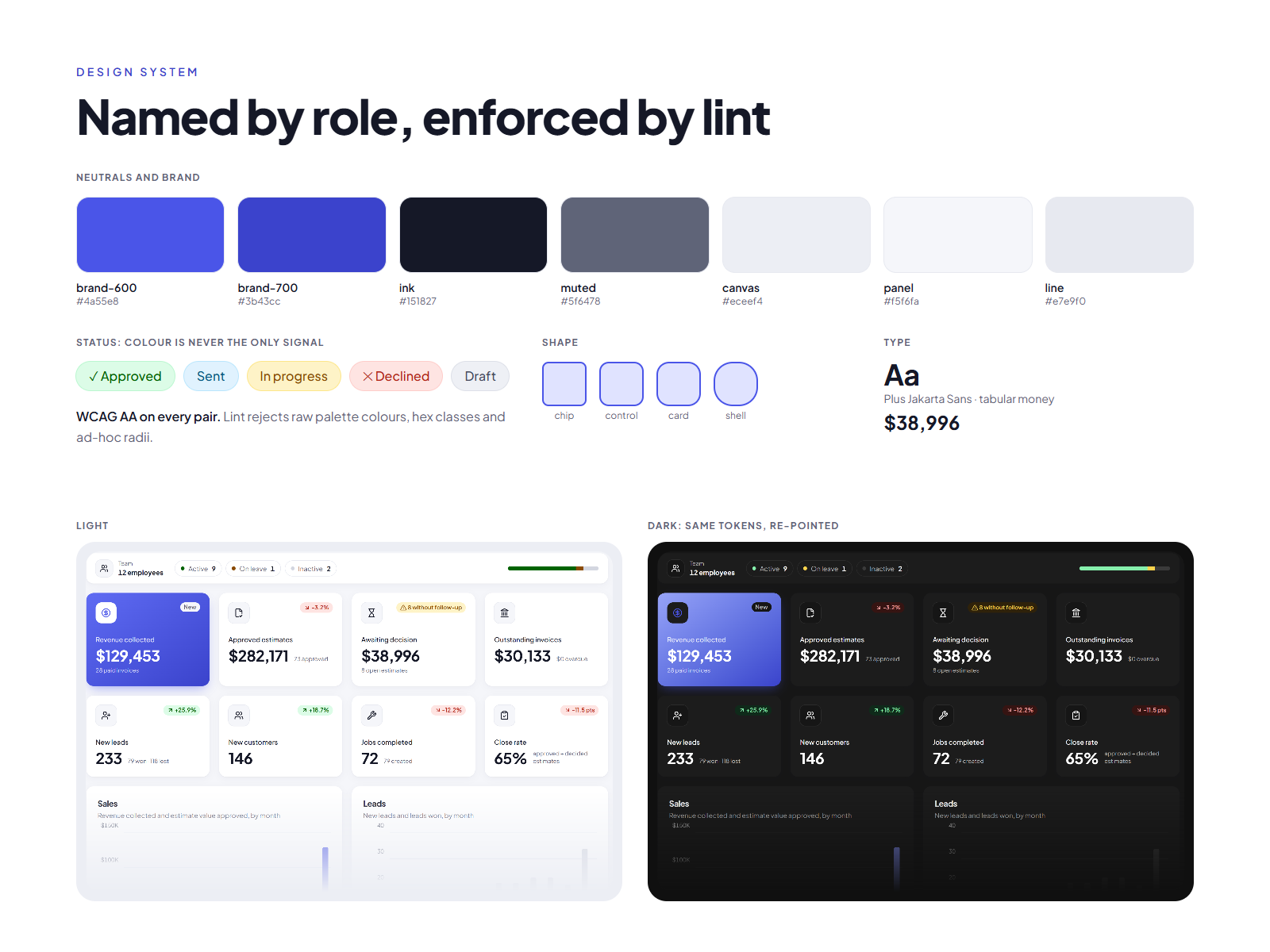
Named by role, enforced by lint.
Tokens named for what they do
Ink, muted, panel, line: not what they look like. Dark mode re-points the same names instead of adding a second palette.
Five status families
Success, danger, warning, info and neutral. Every status pairs colour with an icon or word, so it reads for colour-blind users and in grayscale print.
The linter holds the line
It rejects raw palette colours, hex values and ad-hoc radii or shadows. Four radii (chip, control, card, shell) cover every surface.
Built in, not bolted on.
Contrast AA in both themes
Checked per token pair, including muted text on panels.
Keyboard-complete board
Every drag has a menu equivalent.
Errors in plain words
Say what happened and what to do next, tied to the field.
Tabular numbers
Money lines up in columns, so totals are scannable.
Measuring against the targets, not guessing.
The product is entering a paid pilot. Results aren't in yet, so this study makes no outcome claims. The pilot will track:
| Pilot metric | Measured against |
|---|---|
| Median lead response time | The 60-minute target |
| Estimate decision rate | With and without follow-ups |
| Technician adoption | Jobs closed from the field |
Design the rules, then the screens
Writing the estimate and job state machines first removed whole classes of UI states we'd otherwise have had to invent and test.
Sentences beat charts for busy people
"3 leads waiting over an hour" tells an owner what to do; a graph of the same data only tells them something changed.
Let the tooling hold the line
A lint rule for tokens kept the system consistent in a way review comments never would.
Confidential product, shared with permission in partial form. Images use seeded test data.